
You may remember your parents or grandparents keeping envelopes of cash in the house for dining out, groceries, gas, rent, or other household expenses. They might have called it "cash stuffing," and many knew it as a popular way to save money.
Fast forward a few years and this method is just as relevant today, though most people now use a digital envelope system instead of physical envelopes. It removes the hassle of handling cash while still letting you track every dollar spent. And envelope budgeting isn't just for personal expenses—you can use it to manage your business's cash flow, too. Budgeting works: about 88% of people who budget say it helped them get out of or stay out of debt, according to a 2026 Debt.com survey.
This guide explains the digital envelope system from a small business lens and how to use it to stick to your budget.
What is a digital envelope system?
The digital envelope system is a budgeting and money management technique that helps businesses stick to a budget and control spending.
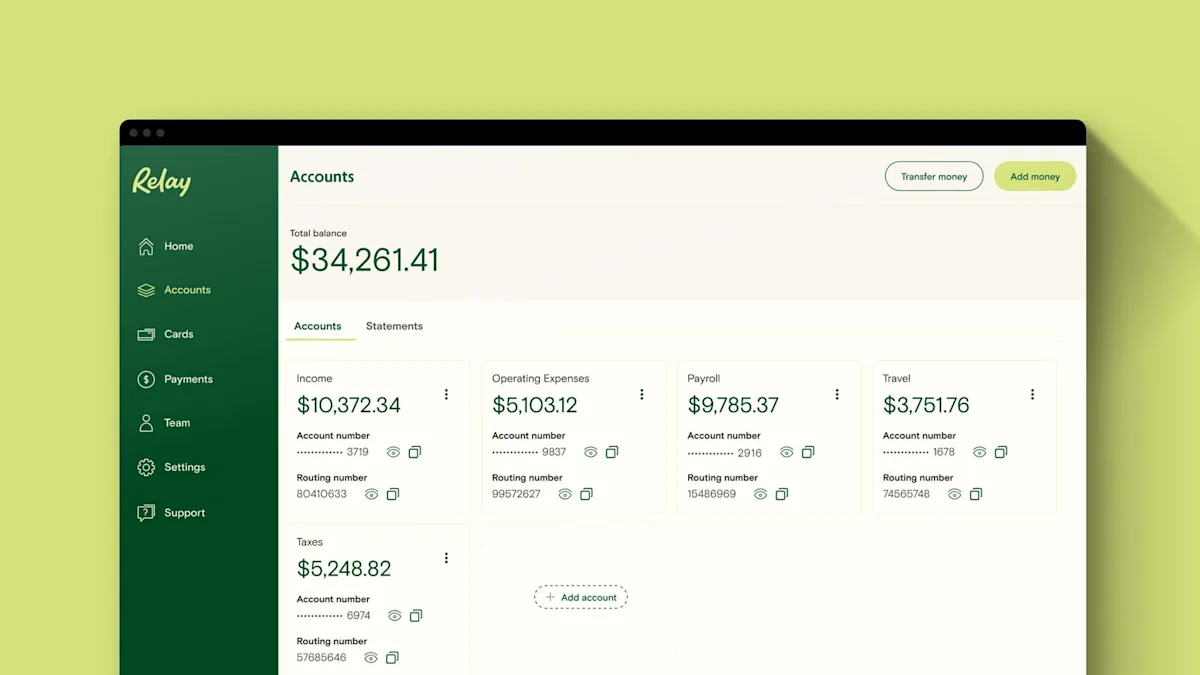
You set it up by creating spending categories, with each envelope representing a type of business expense—like payroll, taxes, marketing, operating expenses, or owner's pay. Then you set a budget for each expense based on your monthly income.
The fundamental idea behind envelope budgeting is simple: since you take your revenue and portion it out, you can't spend more than what you earn (or what your business already has in its checking account).
Physical cash envelopes vs. digital cash envelopes
With the rise of debit cards, credit cards, and payment apps, society keeps moving toward more digital methods of money management. This makes the traditional cash envelope system outdated, especially for business owners who move large sums for monthly expenses.
The idea behind envelope budgeting works just as well without physical cash. Today, there are countless digital envelope systems available as online banking platforms or budgeting apps that track your spending in real time.
Why switch from cash envelopes to a digital system?
The digital version keeps every advantage of cash envelopes—you only spend what's in each envelope—while fixing the parts that don't fit a business. You're not driving cash to the supply house or splitting bills by hand. Balances update in real time, so you can check what's left in "taxes" or "payroll" from your phone between jobs.
It also scales with how a business actually pays and gets paid. Digital envelopes can be real checking accounts with their own account and routing numbers, so vendor payments, payroll, and card spending draw from the right envelope automatically instead of relying on you to move cash. For most owners, that's the reason to switch: the discipline of envelopes without the friction of physical cash.
How to set up your digital envelope system
Now that you know what envelope budgeting is and the tools available, here's how to start using it.
Step 1: determine your monthly business revenue
As a business owner, you should have an idea of how much revenue your business brings in monthly. Review your financial statements carefully. Once you understand your revenue, you'll have a much better idea of how much cash you have available to use in your digital envelope system.
Step 2: create a list of fixed expenses
Once you know how much revenue your business generates each month, the next step is to list the fixed expenses of operating your business. Fixed expenses are the ones that don't change from month to month. This may include rent, payroll, and inventory costs.
Step 3: allocate money for each expense category
Determine how much cash you'll allocate (by percentage or by dollar amount) into each fixed expense type, and how much you'll have left over for accounts like emergency funds, investment accounts, and savings accounts.
You'll also want to set aside some money for variable expenses, like travel, special events, and business-related meals and entertainment.
Step 4: use a digital envelope system to track expenses online
Divide your business's cash into multiple bank accounts, based on the amount you plan to allocate to each expense. You can also use an envelope budgeting app to help with this process (we've listed a few below).
With Relay, you can open up to 20 individual checking accounts to organize your money—with no monthly maintenance fees, no overdraft fees, and no minimum balance requirement.
Step 5: stick to your envelope budget
Once you've set your budgets and set up your digital envelope system, keep track of your monthly expenses. This lets you anticipate budget constraints and move money around if necessary.
Why does the digital envelope budgeting system work?
Because you portion your revenue out in advance, you can't spend more than you have—which means the envelope system works for personal finance, savings goals, and business finance alike.
Physical envelope budgeting worked so well because you could see the amount of cash you had and where it was going. In the digital age, envelope budgeting works just the same, except the numbers are on a screen rather than on bills. You can track your spending habits with digital bank statements, credit card statements, and more.
Although envelope budgeting has been around for decades, finance guru Dave Ramsey is credited for its popularity and resurgence. Nowadays the system is less time-consuming thanks to its digitization.
Pros and cons of the digital envelope system for small business
Digital envelopes are a great way to manage your spending and savings, but that doesn't mean they're perfect for everyone.
Pro: brings awareness to your spending
With envelope budgeting, you can see exactly how much cash you have left in each envelope, which forces you to plan out your budget every month. It holds you accountable to your planned budget by making it very difficult to overspend.
Con: can feel constrictive
If you're not used to this kind of budgeting system, you may feel constricted by it. Occasionally you'll have to spend out of budget or significantly under budget, and either can make you feel like you "failed" the envelope budgeting system.
Pro: easily identify overspending
With envelope budgeting, you can isolate problem areas and prevent issues in one department from affecting another. It's easy to adjust the budget for unplanned circumstances by moving money between envelopes.
Con: time-consuming
Even though the digitization of envelope budgeting has reduced the hassle, some still consider the practice too time-consuming to be valuable. Whether it works for you depends on your timeframe and the tool you use to budget.
Banking and apps built for envelope budgeting
One way to run a digital envelope system is to use an online banking platform with no monthly maintenance fees that lets you create envelopes or checking accounts for different categories of business expenses.
Multiple bank account budgeting makes it easy to allocate the right amount of funds into each envelope or checking account, track your spending, and make sure you don't go over budget.
Relay: an online banking platform with 20 individual checking accounts
If you're a small business looking for a banking solution that lets you create multiple envelopes (AKA business checking accounts) without extra fees, Relay is a strong option.
With Relay, you can compartmentalize your cash across up to 20 checking accounts. Better yet, these are all true checking accounts with unique account and routing numbers—not just abstract envelopes.
Why does this matter? Unique account and routing numbers keep your cash organized. You can set up and schedule different transactions to come out of specific accounts—from internal transfers to contractor payments and software subscriptions.
Relay's features go a step further. You can issue 50 physical or virtual Relay Visa® Debit Cards³ for your checking accounts, so you can organize spending even further—team members, projects, and even special events can get their own dedicated card.
Curious about where to stash your savings? Read our guide to the best small business savings accounts.
³The Relay Visa® Debit Card is issued by Thread Bank, Member FDIC, pursuant to a license from Visa U.S.A. Inc. and may be used anywhere Visa debit cards are accepted.
NorthOne: an online banking platform with sub-accounts
Many small business owners and freelancers have heard of NorthOne as a banking platform that might be right for them. What's the difference between Relay and NorthOne?
The biggest difference is that while Relay lets business owners open up to 20 real, individual checking accounts, NorthOne offers sub-accounts it calls Envelopes. These can operate as a digital envelope system, but not all sub-accounts have their own unique routing and account numbers, which can make it harder to organize spending across accounts.
NorthOne also charges a monthly account fee. Overall, while both platforms are similar, Relay's individual checking accounts (vs. sub-accounts) and its integrations make it a strong fit for envelope budgeting.
Qube Money: an envelope app in transition
Qube Money built its name on a digital envelope banking app: you filled "Qubes" (its version of envelopes) and the card declined a purchase if the Qube was empty. Its banking service closed on September 30, 2025, and that envelope-enforced spending feature is currently unavailable while the company seeks a new bank partner. A stripped-down, track-only companion app entered beta in early 2026, so if you're evaluating Qube Money today, confirm which features are actually live before you rely on it.
Goodbudget: a digital budget tracking app
Goodbudget lets users track spending by allocating funds to different envelopes. Its free plan includes 20 envelopes and syncs across a couple of devices; a premium plan (about $10 a month or $80 a year) adds unlimited envelopes, bank sync, and more devices.
The app doesn't connect directly to your bank account, but you can upload bank transaction files and statements to ease your workflow. Budgets and expenses can also be added manually, so you can review all transactions and check accuracy.
The bottom line on budgeting with a digital envelope system
Now that you know what the digital envelope system is and how it helps, it's time to put it into practice. Envelope budgeting shifts your mindset from reactive budgeting to proactive money management.
If you want an online banking platform built for this kind of structure, opening a Relay account gives it to you out of the box: up to 20 individual checking accounts with no monthly maintenance fees, no minimum balances, and 50 debit cards to keep every envelope's spending in its lane.
Frequently asked questions
Which banks and apps offer a digital envelope system?
Two kinds of tools support digital envelopes: online banking platforms that give each envelope a real checking account (like Relay, which offers up to 20), and budgeting apps that track allocations on top of your existing bank account (like Goodbudget). Banking platforms enforce the budget automatically because the money actually sits in separate accounts; apps rely on you to log and follow the plan.
Is the envelope system good for a business?
Yes—especially for owners who need to reserve cash for taxes, payroll, and materials that come due at different times. Giving each obligation its own envelope (or account) shows what's truly available to spend versus what's already committed, which is exactly the visibility a single checking account can't provide.
What's the difference between a digital envelope and a sub-account?
A sub-account is a compartment inside one main account; some don't have their own account and routing numbers. A true checking-account "envelope"—like the ones Relay opens—has its own unique account and routing numbers, so you can send and receive money directly from it. That distinction matters most when you want vendor payments or payroll to draw from a specific envelope.
Do digital envelopes cost money?
It depends on the tool. Some budgeting apps have free tiers with a capped number of envelopes and paid plans for more. Banking platforms vary: Relay, for example, has no monthly maintenance fees and no minimum balance requirement for its checking accounts. Always check a provider's current pricing page before committing.
BANKING FOR THE SELF-MADE
Get started in minutes.