
Bringing someone into your business finances takes trust. You're handing over access to accounts, transactions, and cash balances—and you want them to have exactly what the job requires. Not more.
The problem is that most banking tools don't give you that choice. Preset roles are either too broad or too narrow. Custom role options look flexible, but the same permissions follow a person into every account. Your bookkeeper ends up in your payroll account. Your office manager can see your full cash position when they don't need to.
So you either hand over more than you're comfortable with, or you stay the bottleneck on tasks your team could be handling. Relay's new Custom Roles close that gap.
Why handing over access has always felt like an all-or-nothing call
When access controls are rigid, the problem compounds fast.
Say you run a business with five accounts: operating, payroll, tax reserves, a savings buffer, and a card account for recurring expenses. Your office manager needs to see incoming payments and upload receipts. Your bookkeeper needs to work in the operating account and sync to QuickBooks, but you don't want her touching payroll. A contractor you've brought on for AP work can submit bills for approval but shouldn't be able to release money.
None of those situations fit a preset. And with most custom role options, you can set what a person can do but the same permissions follow them into every account. There's no way to say: full access here, view-only there, no access to this one.
You end up making a judgment call. You grant more access than you want and accept the risk, or keep doing everything yourself because it's easier than building a workaround.
And when access doesn't match the work, delegation slows down. Routine tasks stay with the owner because no one else has the right permissions. Payments wait for approval. Reconciliation gets pushed to later. The business grows, but the day-to-day work still funnels through one person.
The problem isn't that you don't trust your team. It's that your banking access wasn't built to reflect how people actually work.
The job shouldn't have to fit the role—the role should fit the job
Custom Roles in Relay lets you build team access around the job, not around what the closest preset allows.
You can create a role from scratch or start from a preset and adjust it. Every permission can be turned on or off individually, from viewing balances to moving money, managing cards, and handling invoices.
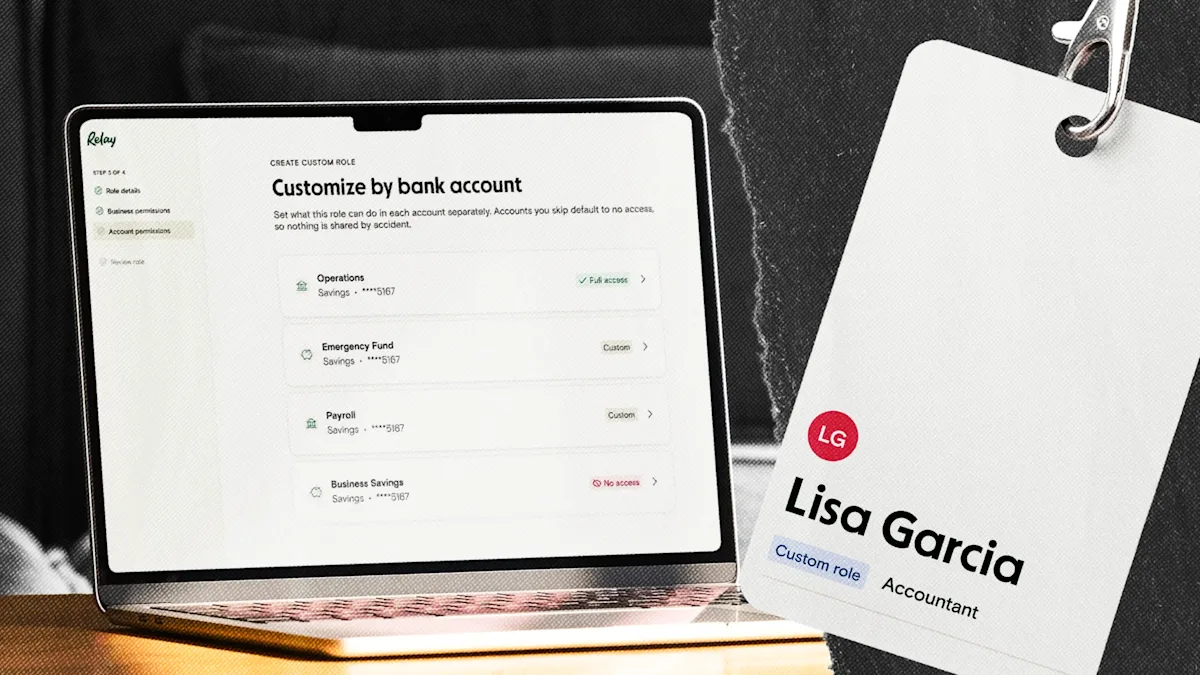
Then you can decide how those permissions apply in each bank account. The same role can have full access in one account, limited access in another, and no access in a third.
Your bookkeeper can have full access to the operating account and no access to payroll. Someone handling AP can submit bills in one account without being able to see your cash position anywhere else. An office manager can deposit checks and upload receipts without a balance showing up on their screen.
You build the role once. Assign it to everyone in that function, and if something changes (a permission needs to be added, or someone leaves the team), you update the role and it automatically applies to everyone assigned to it. It's also easier to maintain consistent access controls as your team grows.
Custom Roles are included on all Relay plans at no extra cost.
Your accounts don't all work the same way, and access shouldn't either
Here are three situations where Custom Roles changes how you bring people into Relay:
Your bookkeeper is in Relay, but your payroll account isn't her business
She needs to categorize transactions and sync to QuickBooks from your operating account. That's it. With Custom Roles, you give her everything she needs in the operating account and nothing in payroll. One role, one invite, and no awkward conversation about what she can and can't look at.
Your office manager handles day-to-day admin, but not financial decisions
He needs to deposit checks, upload receipts, and submit bills for approval. He doesn't need to see your total cash position or move money. You build a role around exactly those tasks and leave everything else off the table.
Your team is growing and roles are changing
When someone new joins in the same function, they get the same access as everyone else in that role, no rebuild required. When someone leaves, you remove them without touching how the role works for the rest of the team.
No other small business banking tool goes to this level
Most banking tools now offer some version of custom roles. The difference is where customization stops.
Some only let you add permissions, not remove them. Others let you customize permissions, but those settings apply the same way across every account.
Relay lets you control individual permissions within each account. Someone can view balances in one account, move money in another, and have no access to a third, all within the same role.
Build access that fits the way your business actually works
Bringing your team into Relay shouldn't mean accepting a role that's close enough. Custom Roles lets you define access around what each person is actually there to do, from the org level down to what they can touch in each individual account.
Log in to Relay to set up your first custom role.
BANKING FOR THE SELF-MADE
Get started in minutes.