
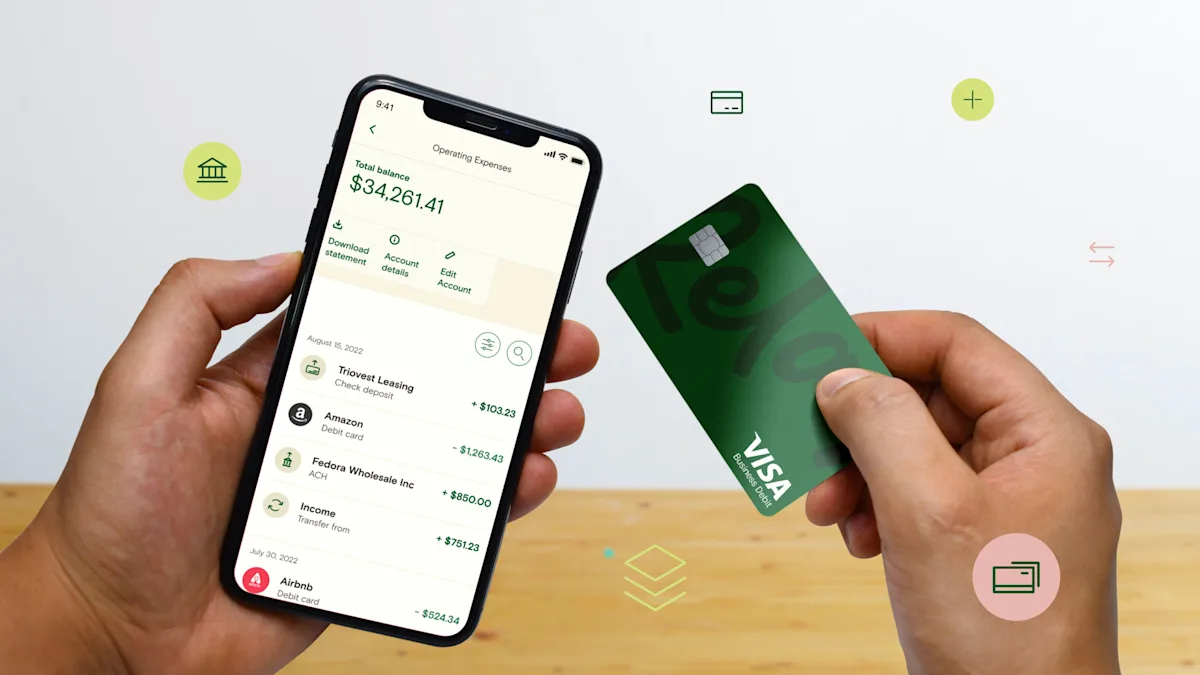
Mobile business banking lets you run your money from your phone—check balances, move funds, deposit checks, and approve payments without ever visiting a branch. For business owners, it's less a convenience than a control panel: a clear, real-time picture of what you're earning, spending, and saving.
Maybe digital banking is new to you, maybe you're trying to choose a new business bank, or maybe you're on the fence about banking apps. Either way, here's what mobile business banking is, the features worth looking for, the benefits, and whether it's safe.
What is mobile business banking?
Mobile business banking is a bank account you can access from your mobile device. You can reach a mobile business bank account anywhere you have phone service, either by downloading a banking app from the app store or opening a web browser on your Android or Apple iOS device.
While both traditional banks and neobanks may offer mobile banking, neobanks tend to offer more advanced digital features. Traditional-bank apps have caught up on the basics—balances, transfers, and mobile deposit—but neobanks are built mobile-first, so tools like automation, sub-accounts, and real-time insights usually run deeper.
Dedicated mobile business banks, also called online banks and neobanks, operate completely online without a physical location. They're designed to be used digitally, which brings real advantages in accessibility, features, and ease of use.
Why is mobile business banking important?
Mobile banking is now how most people bank: in 2023, almost half of U.S. banked households used mobile banking as their primary way to access their accounts—a share that rose nearly ninefold over the prior decade, per the FDIC. Since its early days, digital banking has grown to offer far more than on-the-go convenience.
Mobile banking lets business owners manage their finances from anywhere, with powerful tools that show your cash flow clearly. That gives owners a precise picture of what they're earning, spending, and saving, so they can make the smartest decisions for the business.
Along with the digital toolset, mobile business banks tend to charge lower maintenance fees. Relay, for example, gives you up to 20 checking accounts with no monthly maintenance fees, 50 physical and virtual debit cards, and integrations with essential business tools like Xero, QuickBooks Online, and Gusto—with no enrollment fees, account fees, overdraft fees, or minimum balance requirements.
What features should business mobile banking have?
A strong business mobile banking app should let you run day-to-day finances entirely from your phone. The features that matter most:
Mobile check deposit—snap a photo of a check to deposit it, no branch or ATM trip.
Real-time balances, alerts, and push notifications—instant visibility, and an early warning on anything unexpected.
Card controls—issue, freeze, and set limits on physical and virtual debit cards from the app.
Multi-user access and role-based permissions—add a bookkeeper or team member with scoped access, plus approval workflows before payments go out.
Payment initiation—send ACH, domestic and international wires, and checks without a desktop.
Sub-accounts / multiple checking accounts—separate funds for taxes, payroll, and profit so each dollar has a job.
Receipt capture and enriched transaction data—attach receipts and read clean merchant details for faster bookkeeping.
Accounting integrations—sync with QuickBooks Online, Xero, and Gusto so the books stay current.
Security controls—two-factor authentication, biometric login, and automated fraud notifications.
Not every provider offers all of these, so treat the list as a checklist when you compare apps.
Benefits of mobile business banking
Mobile business banking comes with a range of benefits, including 24/7 access, better security, spending insights, and payments at your fingertips. Together they help you manage cash flow more closely. Here are the top benefits of a mobile business bank account.
24/7 access
Gone are the days when you had to visit a branch to manage your finances. Mobile banking gives business owners access to their funds 24/7 from anywhere. What does that mean for you?
It means you don't have to wait to transfer funds, categorize expenses, or make payments—greater financial efficiency for you and your team. Plus, with a bank like Relay, you get knowledgeable support specialists focused on what you need to reach your goals.
Spending insights
Mobile banking has brought more powerful online banking tools. Understanding when and how money flows through your business—right from your phone—gives you confidence about where you stand. Digital banking also comes with features like enriched data, so you don't waste time decoding purchases.
Having transaction history at your fingertips makes budgeting and quick decisions much easier.
Mobile deposits
Mobile check deposits make it easy to deposit funds on the go without visiting an ATM or branch. Just snap a picture of the check in your bank's app and it imports into your business checking account.
Many mobile bank accounts also let you store check images and memos for easy bookkeeping, so vendor information stays in one place.
On-the-go payments
Mobile payments have come a long way. Online banks now offer features like automatic bill payments with multi-step approval workflows to make sure bills get paid on time using digital debit cards.
With a banking platform like Relay, you can also pay bills using ACH, domestic and international wires, and checks, collect payment data, and automatically sync unpaid bills using account integrations such as QuickBooks Online or Xero.
Cash flow clarity
A mobile business account lets you collect income in one place so you can see exactly what you're working with. A clear picture of your cash flow makes it easy to understand what you're earning, spending, and saving, so you can make the smartest decisions for your business.
With Relay, you get up to 20 checking accounts, so you can automate transfers across accounts using dollar amounts or percentages. This lets you categorize your cash flow using multiple bank account budgeting.
The pros and cons of mobile banking
When considering whether a mobile business bank is right for you, weighing the pros and cons helps. Mobile banking gives you a powerful set of tools at your fingertips 24/7, but the lack of physical branches could be a disadvantage for some owners.
Pros of mobile business banking:
Take better control of your cash: A smarter money-management platform puts detailed banking data at your fingertips.
Get better support: Reach financial support without visiting a branch—specialists can help by email, chat, and phone.
Make on-the-go payments: Transfer funds and make deposits from anywhere, with multi-step approval workflows.
See your spending habits: With auto-categorization and detailed data, you can organize cash flow and expenses using separate checking accounts for greater clarity.
Keep your money safe: Reputable providers hold your deposits at FDIC-insured partner banks, so your money is insured up to $250,000 per depositor, per bank.
Cons of mobile business banking:
No physical branch: Virtual support suits most busy owners, but some prefer in-person banking. That makes mobile banking less ideal for anyone who wants the traditional method.
A learning curve: For those new to mobile business banking, it can take time to learn the online features—which can be frustrating without the right support.
Is mobile business banking safe?
While mobile and online banks are a big step up from the digital services of traditional banks, some wonder whether mobile banking is safe.
Yes, mobile banking is safe. Online banks understand security concerns and put measures in place to protect customers. Most neobanks offer safeguards like fraud detection, two-factor authentication, liability protection, and automated security notifications by text.
Security matters because fraud is common: more than three-quarters of U.S. organizations (76%) faced attempted or actual payments fraud in 2025, and checks remain the most-targeted method, according to the Association for Financial Professionals. Mobile deposit, card controls, and payment approval workflows all cut down on the paper and manual steps fraud tends to exploit.
As an account holder, you also play a key role. Along with choosing a secure online bank, use your own measures like strong passwords and avoiding public Wi-Fi. And choose a provider that keeps your deposits at FDIC-insured partner banks so your money is protected.
Bank with Relay
If you're looking for mobile business banking, we think you'll love banking with Relay. Relay is built for business owners who want to get on the money and make smarter decisions. Relay's platform has no account fees, no overdraft fees, and no minimum balance requirements.
Applying takes minutes—open a Relay account today.
Frequently asked questions
What are the benefits of business mobile banking?
Business mobile banking gives you 24/7 access to your accounts, real-time spending insights, mobile check deposit, on-the-go payments, and clearer cash flow—all from your phone. For owners, the biggest benefit is visibility: seeing exactly what you're earning, spending, and saving so you can make faster, better decisions.
What features should a business mobile banking app have?
Look for mobile check deposit, real-time balances and alerts, card controls for physical and virtual cards, multi-user permissions and approval workflows, ACH and wire payments, sub-accounts for taxes and payroll, receipt capture, accounting integrations, and security controls like two-factor authentication.
Is mobile business banking safe?
Yes. Reputable providers use fraud detection, two-factor authentication, biometric login, and automated security alerts, and they hold your deposits at FDIC-insured partner banks (insured up to $250,000 per depositor, per bank). You strengthen that further with strong passwords, app-based logins, and by avoiding public Wi-Fi.
BANKING FOR THE SELF-MADE
Get started in minutes.